
Click to Whatsapp Ads

Grow Your Business from Click to Whatsapp Ads in UAE

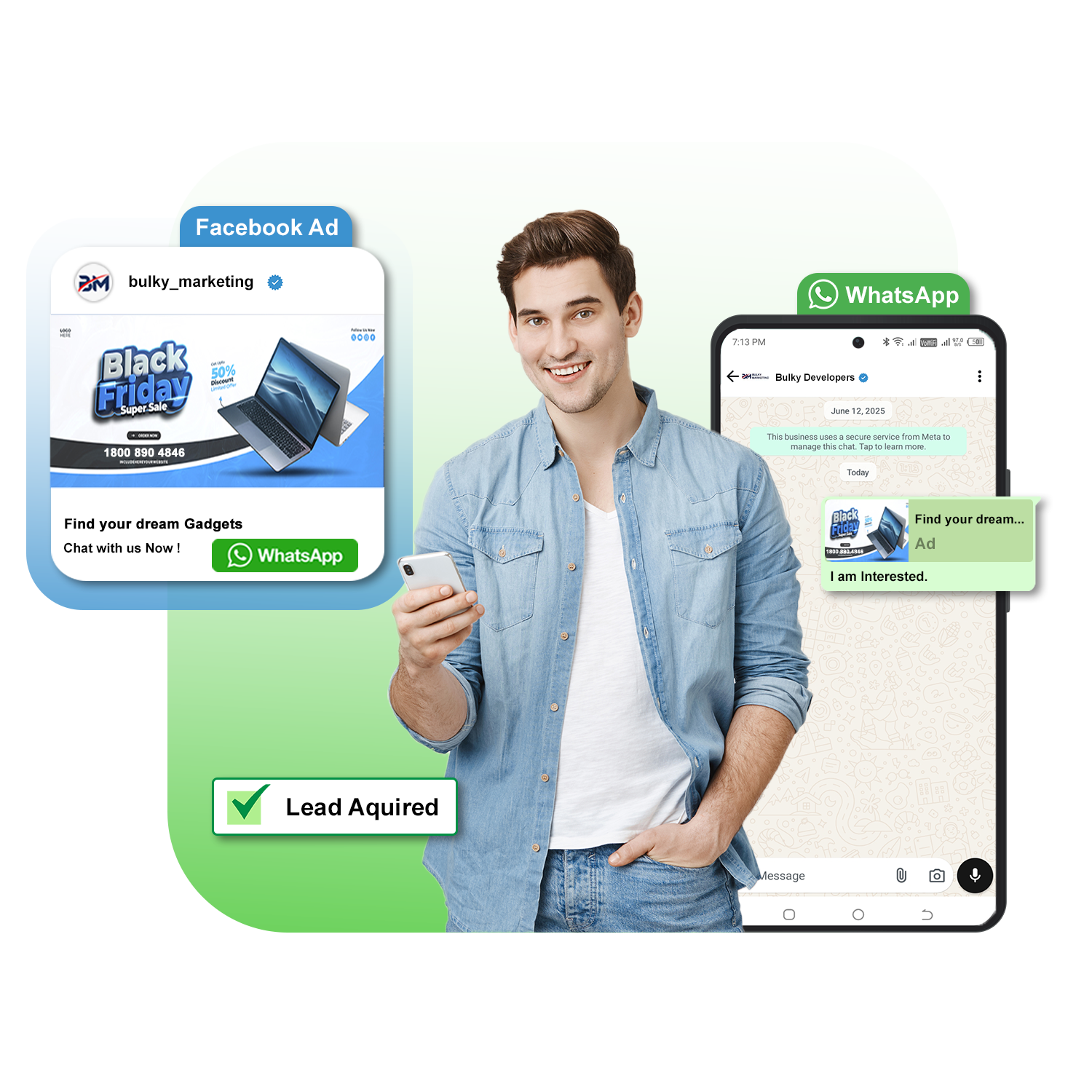
Click to WhatsApp ads are a type of ad format, primarily on Facebook and Instagram, that allows users to directly initiate a ads that click to whatsApp chat when user click on the Instagram or Facebook ads with whatsapp button. We offer best click to whatsapp ads for UAE businesses.

Click To Whatsapp ads

Core merits of Click to WhatsApp ads

Business Transaction

Seamless business transaction

While embracing this procedure, you can avoid forms or landing pages. The entire journey happens smoothly via chatting. These ads are mostly found on Instagram and Facebook stories, feeds and marketplace.
Automated Msg

Automated message

The filled-up message is meant to gather elaborate data about the customer query. With the right selection of the messages, one can easily initiate a conversation with the business owner quite promptly.

Call to action

CTA button

This distinct button is meant to click and get transferred to WhatsApp chat.

Final Tool Icon

Business tools

To avail Click to WhatsApp ads, you ought to have a Business Account in WhatsApp. Else, you need to have API for setting it up.
What is Click to WhatsApp Ads Feature?

Whenever we open platforms like Instagram and Facebook, we often come across certain advertisements. While we click on those ads, instantly a business chat opens up on WhatsApp. These advertisements are Click to WhatsApp ads.

These are meant to provide a direct and personalized connection with the business owner and the customer. These sorts of ads are immensely helpful for instant engagement, sales, lead generation and so on. Customer thus gets the much sought after provision to encounter with pre filled messages. Inconsequently, the messaging app showcases its utility with proper streamlining of the business conversation. Ultimately, encounter with a customer happens in the most hassle-free way via this.

Whatsapp Marketing

Business Benefits of Click to WhatsApp Ads UAE

  • Instant business conversation: You can access your potential customer almost instantly with this feature. You avail the scope to indulge into a conversation in minimal time.
  • Personalization: You get the marvelous scope to personalize the discussion due to the perfect provision of customizing facility.
  • Sales escalation: Another unique reason to consider this process is you can track the actual needs and finish the entire process of sales through WhatsApp chat itself. So, the entire procedure is performed with utmost convenience. .

Simple steps to set up click to WhatsApp ads

  1. Linking of accounts: You need to link the Instagram or Facebook page to WhatsApp Business Account at the onset.
  2. Creation of Advertisement: opt for the objective of messaging in Meta Ads Manager.
  3. Ad designing: Design the advertisement on Instagram or Facebook first. Ensure the ad appears compelling so that the customers may get the initial interest to explore the same.
  4. WhatsApp setting: Include your pre filled messages in WhatsApp, wherein you can get the chance to interact with your potential customer.
Click to whatsapp ads

Utilitarian features of click to WhatsApp Ads in UAE

These days several business owners prefer to opt for whatsapp click to ads as the feature is indeed high on utility.
These are the pivotal reasons for which so many business owners are inclined to avail this facility.

whatsapp marketing services india

E commerce

Be in terms of product promotion, customer interaction or ease of purchase, this process is just unparalleled.

bulk contact number

Benefit in terms of services

The entire process of booking appointment or consultation gets seamless while one embrace this.

bulky log whatsapp

Lead generation

You get the perfect provision of offering best sort of guidance to the prospects.

Working of Click to Whatsapp Ads

Step1: Go to Ads Manager & connect your Facebook Business Manager

First, go to Ads Manager section and connect your Facebook Business account through which you wish to run Ads that Click to WhatsApp Ads. Once this is done, connect your WhatsApp API number to complete the Meta Ads setup.

Once this is done, connect your WhatsApp API number to complete the Meta Ads setup.

Step2: Create Your Ads that Click to WhatsApp

In Meta Ads Manager, click +Create Ad & fill in these fields:

  • Advertisement Name – The name can be anything Advertisement
  • Caption – Make sure you nail the copy to get maximum clicks on the ad.
  • Website Link – Add the link to your website.
  • Headline – This Headline will appear in Bold beside the clickable WhatsApp icon.
  • Media – This is the image users will view while interacting with your Ads that Click to WhatsApp.

Step3: Fill in your Ad Demographics

Next, select your per-day budget & duration of the advertisement.

Once you pick the budget & duration, you’ll get an estimated budget for your Ads that Click to WhatsApp.

Step4: Pick a Budget

After picking your budget, click Next.

Step5: Submit Ad for Approval

On the next screen, tap “Create” to submit your Click to WhatsApp Ads for approval.

Facebook generally takes 15-20 minutes to verify & approve/reject your Ad content.

If your Ad gets rejected, you can view the rejection reason in your Facebook Ads account.

Step6: Monitor Your Ad Analytics

You can easily monitor your Ad performance by going to Ads Manager & clicking on your CTWA Ad.

It’s time to start creating Ads on Facebook/ Instagram via Bulky Marketing & drive leads to your WhatsApp Business account.

Choose us for Reliable WhatsApp Click to Ads in UAE

Placement

Click to WhatsApp ads are typically displayed on Facebook and Instagram feeds, stories, and marketplaces.

Call to Action

The ads feature a button (e.g., "Send Message," "Contact Us") that, when clicked, initiates a WhatsApp chat.

Direct Connection

Instead of directing users to a website, these ads send them directly to a WhatsApp conversation with the business.

Lead Generation & Engagement

Businesses can use these ads to capture leads, answer questions, provide product information, and offer support.

Automation

Conversations can be handled by a human agent or automated using the WhatsApp Business API and tools like chatbots.

Connected Clients

Contact us For Best Click to Whatsapp Ads in UAE

With the usage of Click to Whatsapp Ads feature business owners are easily tracking their target customers without putting extra effort. Moreover, communicating with the target audience and getting a fruitful outcome has become so simple with the perfect intervention of this stellar procedure. No matter whether you intend to offer customer service, boost sales  or increase leads, this process will prove to be helpful for you. Best part is the entire sales process will be performed in negligible time span.

Getting into in-depth conversation with customer has never been that simple and effortless before. Hence, no matter in which domain your business is, you ought to explore this option. For sure, first-time experience will compel you to continue with this unique mode of business transaction for years to come. Want to know more about this feature or benefits of Click to Whatsapp Ads in UAE, Dubai. Contact us or send your requirement, our support staff is always available to help you.

Frequently Asked Questions

Take a important knowledge about Click to Whatsapp Ads.!

What is WhatsApp Business API?

WhatsApp Business API is a solution that allows businesses to communicate with their customers on the WhatsApp platform at scale. It provides advanced features and capabilities for businesses to send notifications, provide customer support, and engage with users.

  • In addition to their business name, WhatsApp gives businesses with the Official Business Account status a blue tick. This is visible in the display name of your contact number even if your WhatsApp business number is not explicitly saved by your users.
  • However, WhatsApp’s decision to approve your blue tick verification is completely up to them. Their decision in this regard would be final. Multiple factors such as brand credibility, your following on social media, listing in external media and your domain ranking can influence your blue tick approval.
  • To request for a blue tick verification, you can simply connect with our support team and send in a request. It normally takes about 3 business days to get the approval. Your number will automatically be displayed alongside the blue tick as your business name to your users once your request for the blue tick is approved. This will demonstrate that your company has been verified. You will still be able to use Bulky marketing and the WhatsApp business API even if your application for the blue tick is turned down.

Unlike the standard WhatsApp Business App, which limits broadcast messages to 256 recipients, the WhatsApp Business API empowers you to unleash unlimited broadcast messaging capabilities. With an official WhatsApp Business API account, you can send messages without the risk of being banned, ensuring seamless communication with your audience. Moreover, your messages will bear the prestigious Blue tick, indicating their authenticity as verified by WhatsApp. Embrace the vast array of additional features available exclusively to WhatsApp Business API users, including interactive messages, chat buttons, product catalogs, in-chat payment options, and much more. Elevate your business communication to unprecedented heights with WhatsApp Business API.

  • Message Templates (notifications)

  • Session Messages (2-way chats within 24 hours)

  • Chatbots & automation

  • WhatsApp Flows (forms and menus)

  • Media support (images, PDFs, videos)

  • Customer tags, analytics & reports

  • Integration with CRMs and helpdesks

  • Direct communication with customers on a popular and widely-used messaging platform.
  • Ability to send timely notifications, such as order updates and appointment reminders.
  • Enhanced customer support with features like automated replies and chatbots.
  • Detailed analytics and insights to measure the effectiveness of your WhatsApp campaigns.
  • Rich media support for sending images, videos, and documents.WhatsApp Business API is a solution that allows businesses to communicate with their customers on the WhatsApp platform at scale. It provides advanced features and capabilities for businesses to send notifications, provide customer support, and engage with users.

Once a customer sends a message, a 24-hour window opens where your business can send free-form messages without templates. After that, only template messages are allowed unless the customer replies again.

Experience seamless support by contacting Bulky Marketing, where our dedicated team of experts will provide personalized assistance. Alternatively, you have the option to apply directly through WhatsApp. However, it”s important to keep in mind that choosing the direct application route may entail additional time, effort, and developer resources compared to leveraging the comprehensive support offered by Bulky Marketing.

error: Don't Copy Content and image !!

BOOK DEMO

Fill out the form below and we will be in touch shortly